When a conversation gets busy, it isn’t always obvious which comment someone is responding to. Is that “Sounds good!” for the new deadline, the latest design, or something three comments back? 🤔
That’s where comment replies come in. You can reply directly to specific comments, so there’s no confusion about what you’re responding to. It works on to-dos, messages, files, cards, events, and anywhere you can comment in Basecamp.
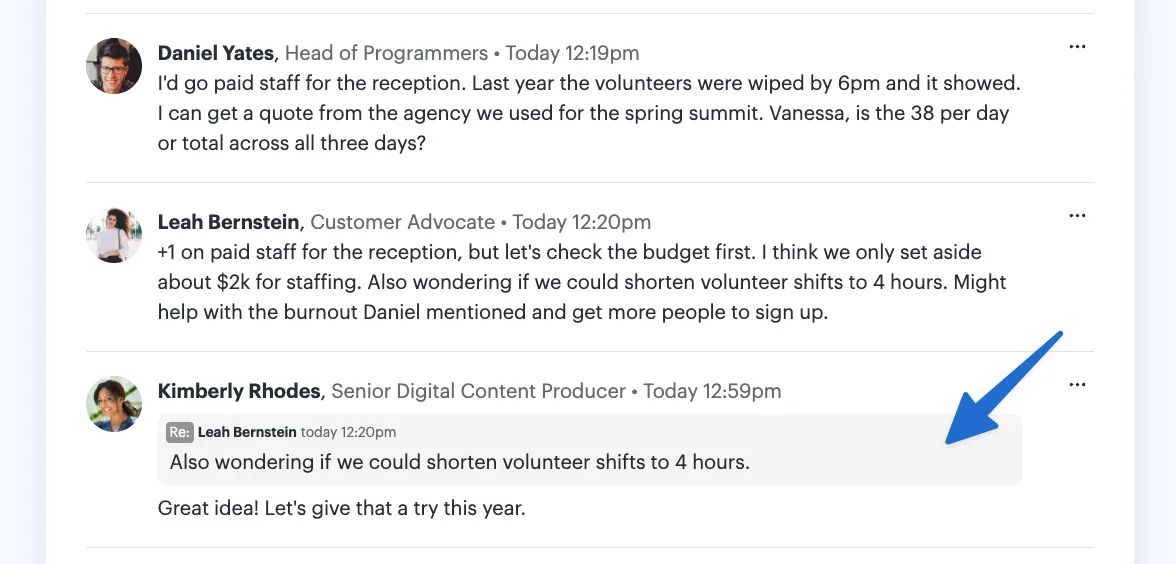
Hover over a comment and click Reply to quote the whole thing, then add your response. Or, highlight just the part you want to respond to and click Reply to quote only that portion. Your reply will include the quoted text, making it clear exactly what you’re responding to.
You can select and quote part of a message in Pings and Chats, too. Just highlight the bit you want to respond to before clicking the ••• menu and choosing Reply.
The new reply options are available on the web and in the desktop apps. Check out this quick video to see the updates in action.